…this morning was very beautiful, and so was the sky…

(Usually I sleep at this time of the day, but there are exceptions to the rule… like today. And now I go to make tea and coffee and wake up my beloved;-)
…this morning was very beautiful, and so was the sky…
(Usually I sleep at this time of the day, but there are exceptions to the rule… like today. And now I go to make tea and coffee and wake up my beloved;-)
That’s just great!
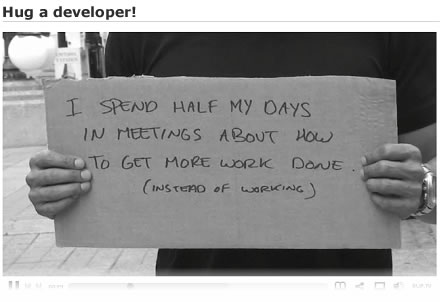
Quick, quick, designers and developers need a hug, help!!! :-)
UPDATE (2013/Nov/18): There is a new and better way of dealing with the issue. Simply download and install the following Firefox add-on:
https://addons.mozilla.org/en-US/firefox/addon/remember-passwords/
It will patch automatically the original Firefox Login Manager, to allow saving of passwords on forms which otherwise suppress it.
If you want to try the older, manual method of doing it, check my older post (see below); mind, in latest versions of Firefox the manual method may not work — I haven’t tested it.
* * *
Note: The following “trick” applies to Mozilla Firefox, versions 3.0.x, 3.5.x and 3.6.x. For Firefox v. 4.0.x and later, please refer to the following comment (thanks, Jason!).
You have maybe noticed, when you log in to PayPal, Yahoo! Mail, Live Mail and some other websites, that Firefox 3 does not give you the option to save the name & password for you, which in certain cases is a nuisance.
The reason? Security. In the forms of these websites, in the field INPUT, the following code appears:
<input autocomplete="off" type="..." ... />
When "autocomplete" is ‘off’, then the browser (quite correctly) does not give the user the option of saving the password for him. For websites, such as PayPal, for example, using which you can transfer small or large sums of money, this is a very wise approach.
On the other hand, in this case, you have to manually type each time your username and/or password, which can be quite annoying (especially if they are very long/secure). If you are using your own computer/laptop, and you think that you do not need that extra bit of security, there is a very easy way to make Firefox 3 to remember the passwords even for these secure websites, which set autocomplete to “off”.
Here’s how:
First tutorial (to achieve this stunning effect):
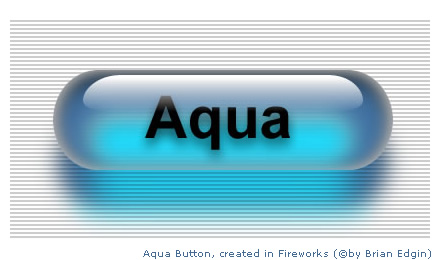
Fireworks How To: The Ultimate Aqua Button (tutorial) (by Brian Edgin)
A few days ago I was recommending to people not to upgrade to version 2.5 of WordPress, because at the time I believed WP 2.3.3 to be as stable and safe as the new 2.5 series. Besides, I liked (and still like) the old, ‘classic’, 2.3.x admin interface much more…
OK, I must take my words back and confirm that WordPress 2.3.3, the last stable release before the new WordPress 2.5 branch was released, is not safe anymore, and you can become a victim of the link injection hack (vulnerability).
What happened?
In one of the blogs, which I support (luckily, not my personal blog, which I have upgraded to 2.5/2.5.1 long ago), I have found ‘hidden’ links (code: <u style="display: none">[ bunch of spam links inserted here ]</u>) in one of the regular posts there.
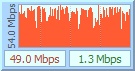 Some time ago I was using and I was pretty excited about a small app, called DU Meter.
What it did, exactly?
Well, it just monitored my Internet bandwidth (current speeds of download/upload).
These were the times of good ol’ dial-up connections (33.6 kbps or, when you were lucky, 48-56 kbps).
Now these times are long gone, and speed is measured in Mbps, not in kbps… :-)
But DU Meter is still there, and Hagel Tech even released a brand-new version – 4.0:)
You can download it here: http://www.dumeter.com/download.php
It’s a trial, which will work for 30 days; after that, you can either stop using it, or buy a single license for USD 24.95.
Still, you should be aware, that a similar app exists now, and it is called Net Meter (current version is 1.1).
It does exactly the same things as DU Meter, but it’s freeware (you can make a small donation, though, if you like the program).
I tested both apps. Net Meter, to be frank, simply copied most of DU Meter’s interface look & feel (which is a good thing, if you are accustomed to DU Meter, but do not want to pay 25 dollars to buy it), and, apart from that, I do not see any major differences between them.
Which one to use, you may decide for yourself; still, it’s nice to know you have more than one option! :-)
Do I see wrong, or Google have just changed their favicon??
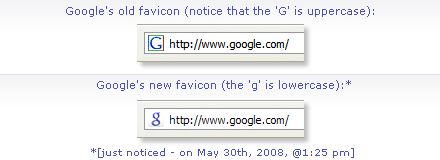
I think I kinda liked the old one more… Besides, the new one has a lowercase ‘g‘, and the old one was with an uppercase, as in their logo.
Maybe Google will change their logo soon, too?… :-)
I saw some of the Erik Dasque’s excellent work by accident, following a link from the Zen Photo gallery.

See his portfolio here:
I myself, being an amateur photographer, have tried numerous times to make beautiful macro photos of flowers and such, but this nice defocus I see in the example of Erik, made with a Canon 5D, shows clearly how far away are small digital cameras from the professional DSLRs…
This flower, by Erik, I liked very much, so I am using a resized copy of it here, with link & credits; I hope this is not a problem… :-)